|
SUBJECT:
ECM REPROGRAMMING FOR HARD TO RE-START ENGINE WITH LOW COOLANT TEMPERATURE
|
No: TSB-16-13-001REV
|
|
DATE: March, 2016
|
|
MODEL: 2014-16 Outlander
|
|
CIRCULATE TO:
|
[ ] GENERAL MANAGER
|
[ ] PARTS MANAGER
|
[ X ] TECHNICIAN
|
|
[ X ] SERVICE ADVISOR
|
[ X ] SERVICE MANAGER
|
[ X ] WARRANTY PROCESSOR
|
[ ] SALES MANAGER
|
|
This bulletin supercedes TSB-16-13-001, issued January, 2016, to add 2016 model year Outlander, and updated ECM software. Revisions are italicized and indicated by
 . .
|
PURPOSE
Affected vehicles may exhibit a condition where the engine is hard to re-start if engine coolant temperature is low. Due to inappropriate programming in the engine ECM, if the coolant temperature is between 32 - 68 °F (0 - 20 °C), a hard to re-start condition may occur.
This TSB instructs dealers to reprogram the ECM with new software that will resolve this concern.
AFFECTED VEHICLES
- 2014 - 2016 Outlander vehicles (US and Canada) equipped with 6B31 V6 3.0L engines
REQUIRED OPERATIONS
- Confirm your MUT-III is updated with the latest reprogramming database.
- Reprogram the ECM with the new software. Refer to the ECM Reprogramming Chart for new software information.
IMPORTANT: If an affected vehicle has a Malfunction Indicator Lamp (MIL) illuminated before reprogramming, and DTCs are listed in the ECM memory, diagnose and repair those DTCs per the service manual before reprogramming. DO NOT reprogram the ECM until the reason(s) for other DTCs being set is corrected.
EQUIPMENT
The following equipment is needed to reprogram the ECM.
- VCI (Vehicle Communication Interface) or VCI Lite - MB991824 or MB992744.
- MEDIC Laptop/Tablet with A/C power adapter - 520924, or FZG1MK2.
- MUT-III main harness 'A' (blue connector at the DLC end) - MB991910 or MB992745.
- USB 2.0 cable - MB991827 or MB992747.
- “Engine Compartment/Control Module” label - p/n MSSF024G00.
- MEDIC 3/4 update at 382 or higher.
- For Standalone MUT-III units, MUT-III Reprogramming Database N16031 or higher.
ECM REPROGRAMMING CHART
Database No. 16031
|
Model
|
ECU Part Number
|
Data No.
|
Software Part Number
|
|
Previous
|
New
|
|
2014 Outlander
(NAS, GF4W, 6B31, AT)
|
1860B805
|
1862C371
|
ZM1024-13
|
ZM1024-14
|
|
2014 Outlander
(Canada, GF4W, 6B31, AT)
|
1860C221
|
1862C372
|
ZM1063-03
|
ZM1063-04
|
|
2015 Outlander
(NAS, GF4W, 6B31, AT)
|
1860C554
|
1862C373
|
ZM1162-01
|
ZM1162-02
|
|
2015 Outlander
(Canada, GF4W, 6B31, AT)
|
1860C555
|
1862C374
|
ZM1163-01
|
ZM1163-02
|
|
2016 Outlander
(NAS, GF4W, 6B31, AT)
|
1860C572
|
1862C369
|
ZM1177-07
|
ZM1177-08
|
|
2016 Outlander
(Canada, GF4W, 6B31, AT)
|
1860C573
|
1862C370
|
ZM1253-04
|
ZM1253-05
|
REPAIR PROCEDURE
|
NOTE: Reprogramming the ECM with the latest database (e.g., N16031) includes all past and current reprogramming for TSBs of affected vehicles. It is not necessary to reprogram the ECM for each previous TSB.
|
- Check the underside of the hood to verify there is no “Authorized Modification” label (see step 19 in the Reprogramming Procedure for example) previously installed to indicate this reprogramming has already been completed. If a label is present and the “ROM ID #” on the label matches the “New S/W Part No.” in the table above, the ECM is at the latest level and reprogramming is not necessary. Conduct normal diagnosis for the described condition.
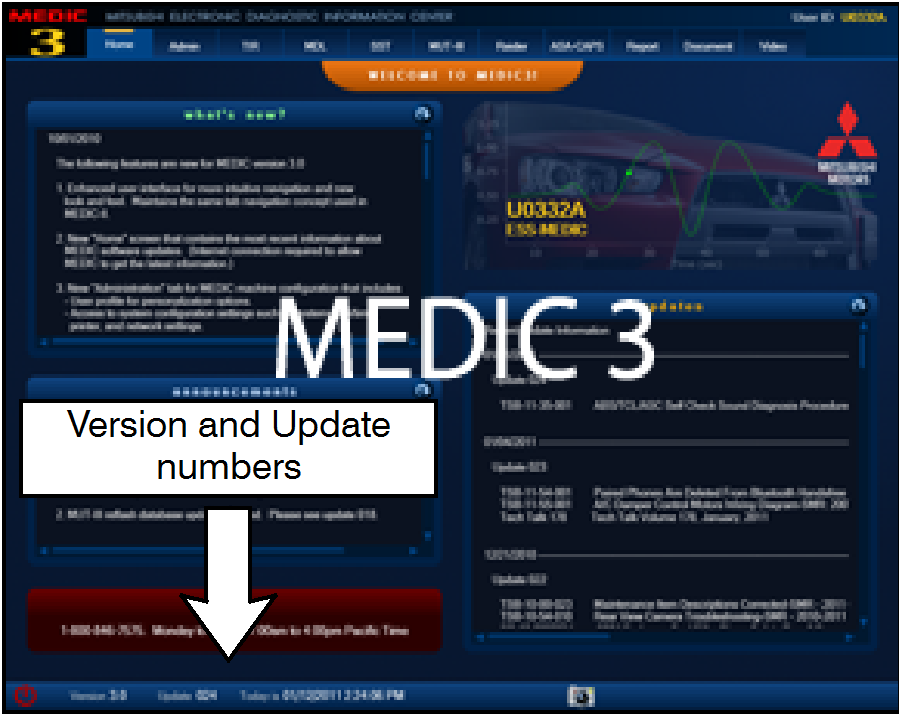 |
For MEDIC 3/4 users only: (MUT-III users go to step 5)
- Verify the MEDIC 3/4 is at version 3.5 and at update 382 or higher.
If your MEDIC 3/4 update is at least 382, continue with the Reprogramming Procedure on page 4.
If your MEDIC 3/4 update is below 382, update your MEDIC as follows.
|
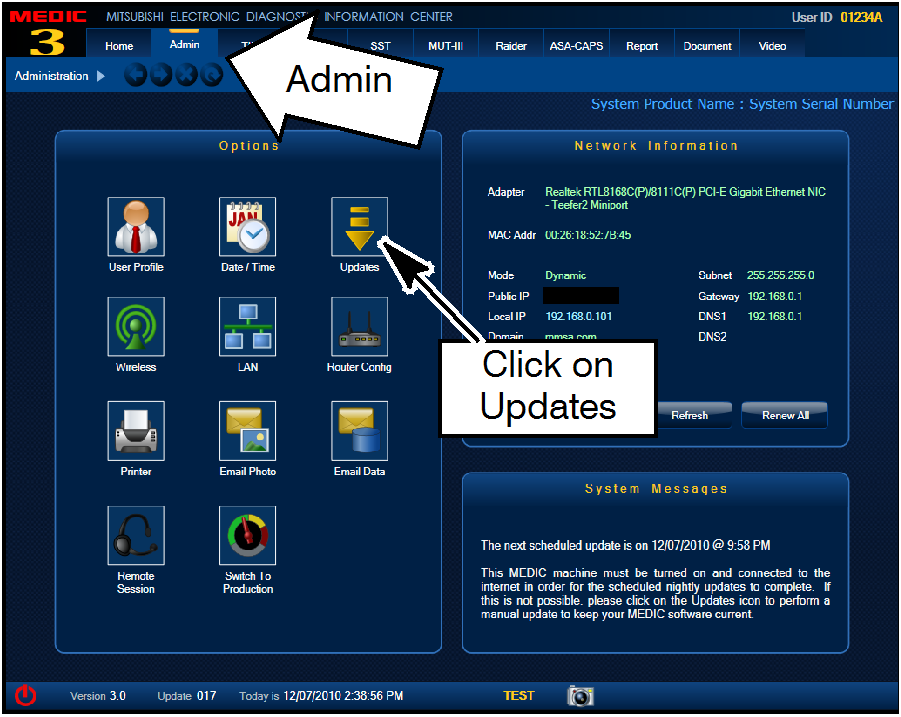 |
- Select the MEDIC 3/4 Admin tab and click on “Updates.”
|
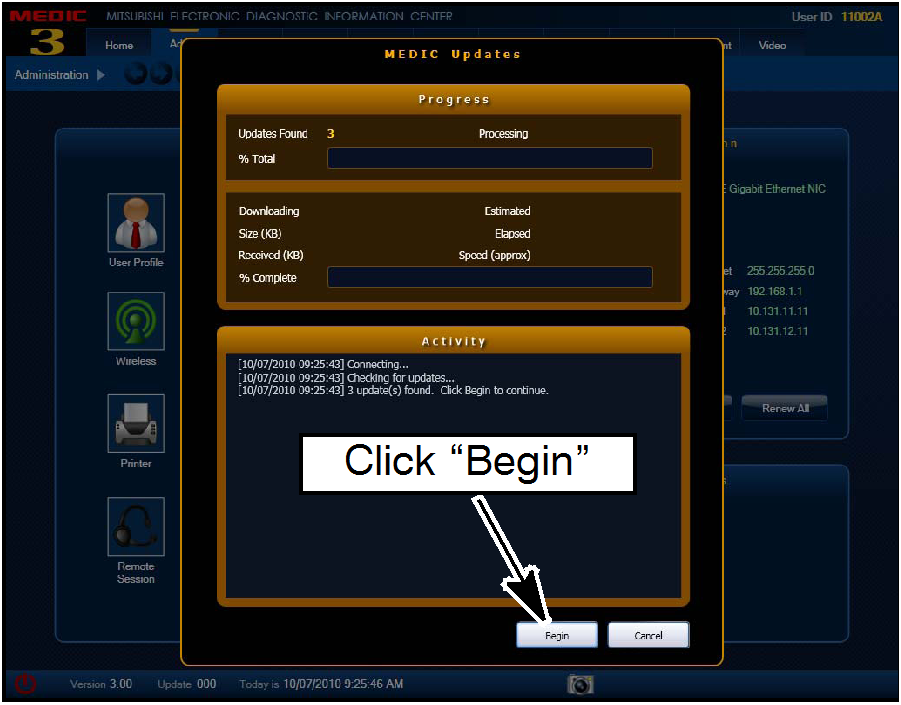 |
- IF the MEDIC update screen advises updates are available, click the “Begin” button. After all updates are complete, GO TO THE REPROGRAMMING PROCEDURE.
|
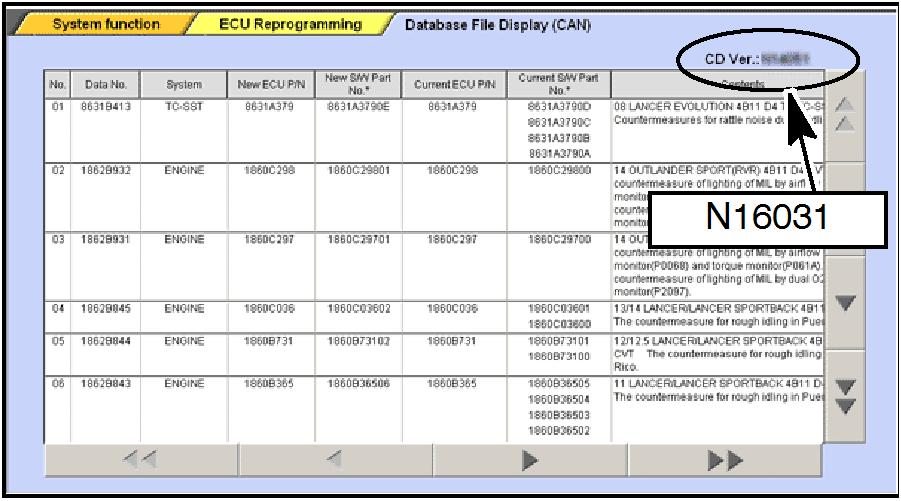 |
- STANDALONE MUT-III SCAN TOOL VIEWER (STV) ONLY: (MEDIC 3 USERS GO TO THE REPROGRAMMING PROCEDURE). Verify that your MUT-III has the most current version of the reprogramming database:
From the MUT-III Main Page:
● Select “Special Function”
● Select “ECU Reprogramming”
● Select “Database File Display-CAN”
● Confirm the database number displayed at the top right of the chart is N16031 or higher
- If the database number displayed on your MUT-III is N16031 or greater, continue to the Reprogramming Procedure.
- If the reprogramming database number displayed on your MUT-III is lower than N16031, locate the reprogramming CD containing database N16031 and follow the instructions provided with the CD to update your MUT-III.
|
REPROGRAMMING PROCEDURE
 To ensure that the vehicle battery maintains 12V during the procedure, hook-up a battery charger to the vehicle during the procedure.
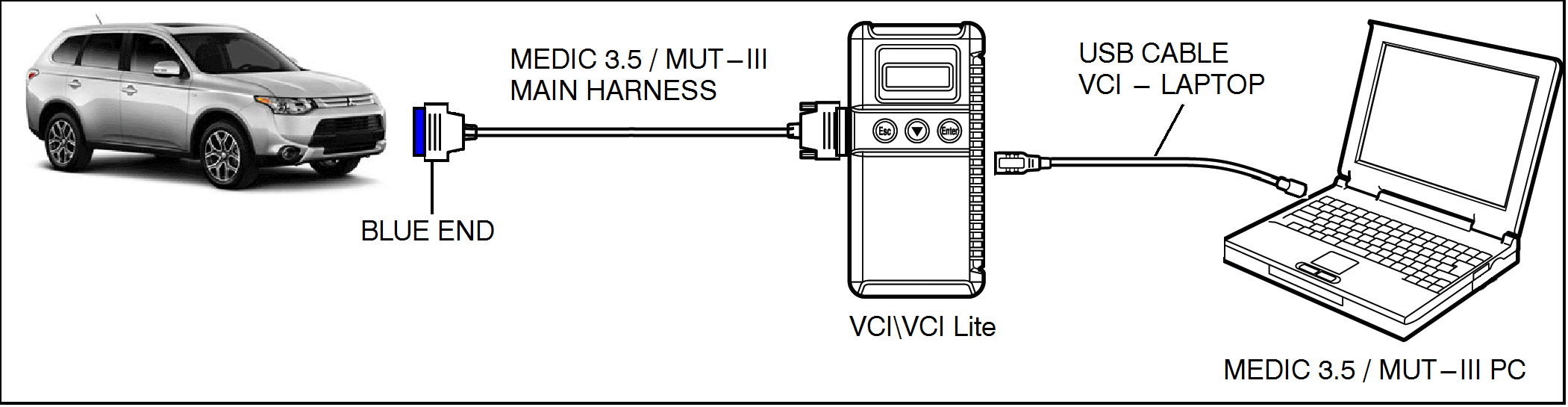
- Connect the equipment as follows:
- Turn the MEDIC PC/tablet on. If the battery indicator in the lower right hand corner of the screen does not show a full charge, it is recommended that either the battery be charged prior to beginning, or be used with the A/C power adaptor connected.
- Connect the USB cable to the VCI/VCI Lite.
- When the laptop/tablet displays the MUT-III main screen, connect the USB cable to the device.
- Connect the MUT-III main harness with the blue DLC connection to the VCI/VCI Lite.
- Connect the blue connection of the MUT-III main harness to the vehicle's data link connector.
- Turn the VCI power switch ON . Verify that the indicator lamp in the upper right corner of the screen is green.
NOTE: VCI and MEDIC 3.5 Laptop shown for illustration purposes only.
- Turn the ignition switch to the “ON” position.
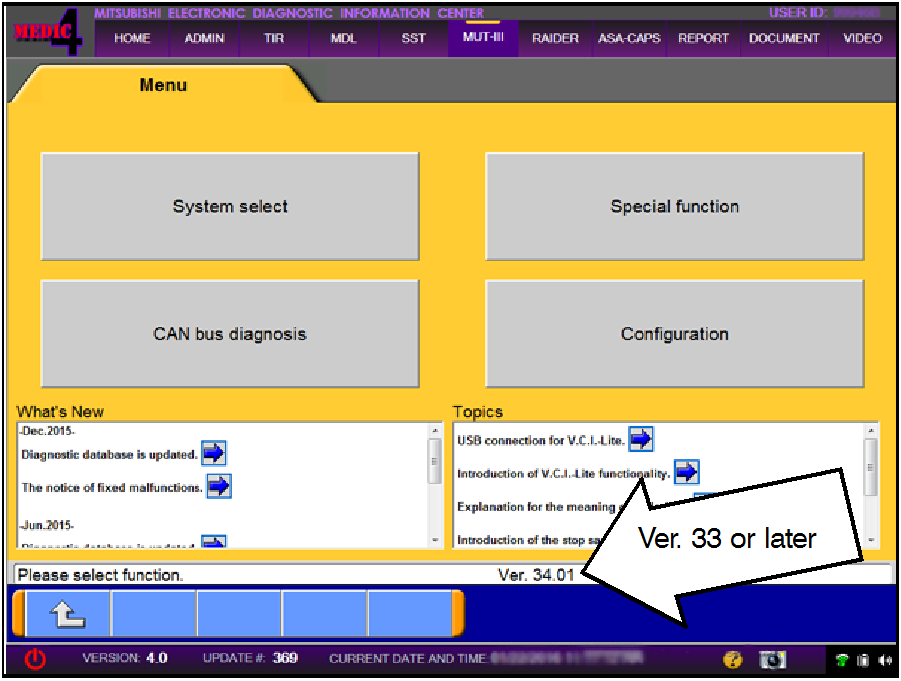 |
- If using MEDIC, from the main page, click the MUT-III STV icon at the top center of the screen to open MUT-III.
|
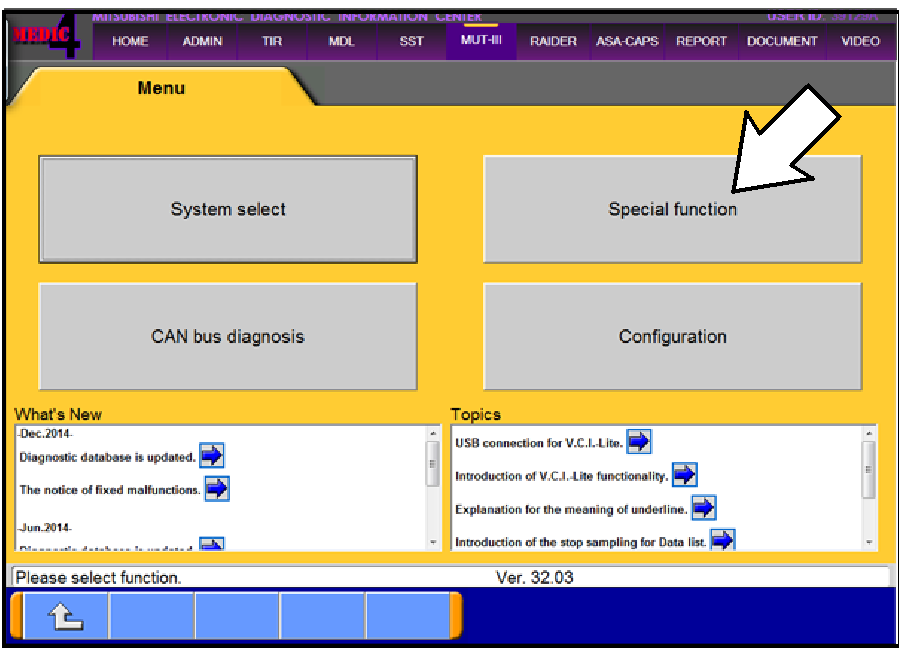 |
- Go to the MUT-III home screen and click on “Special function.”
|
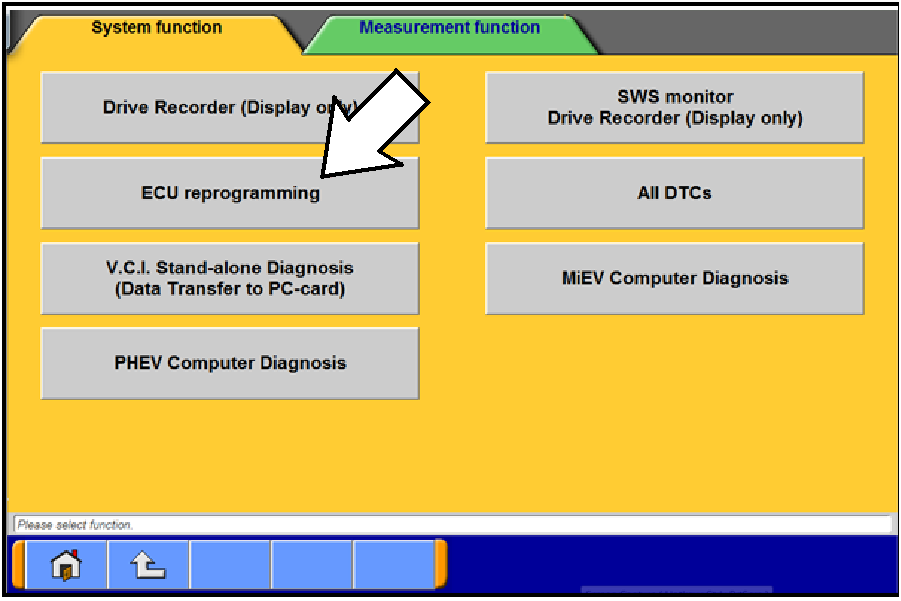 |
- Select “ECU reprogramming.”
|
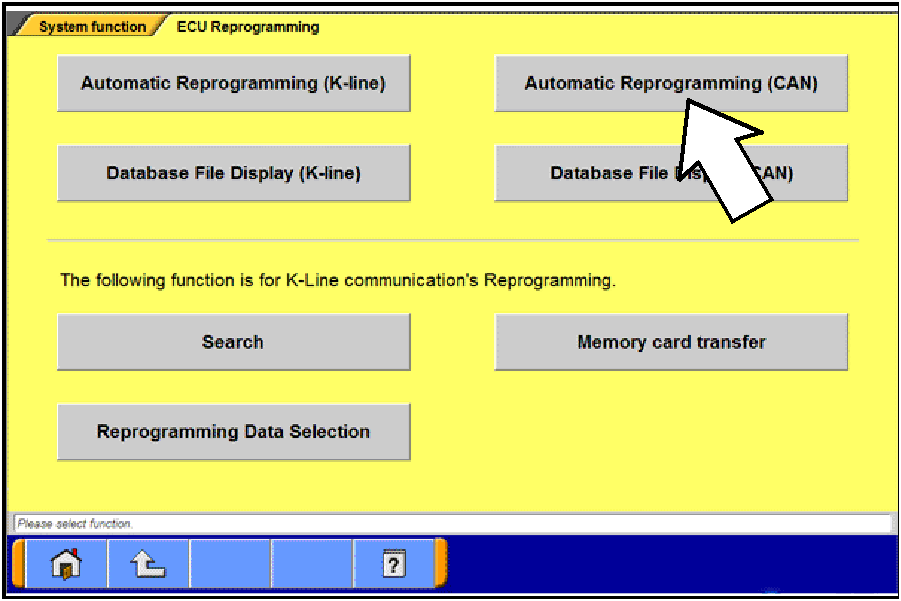 |
- In ECU reprogramming, select “Automatic Reprogramming (CAN).”
|
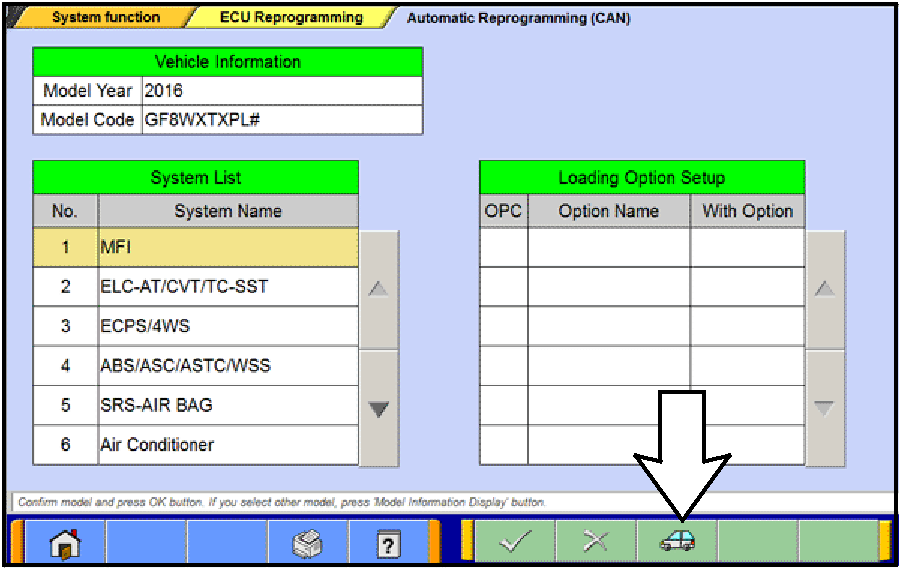 |
- Press the model information display button (car icon) and verify that all vehicle information is correct.
- If vehicle information is NOT correct, follow steps a - c below.
- If vehicle information is correct, click the check mark at the bottom of the page, then go to step 8.
|
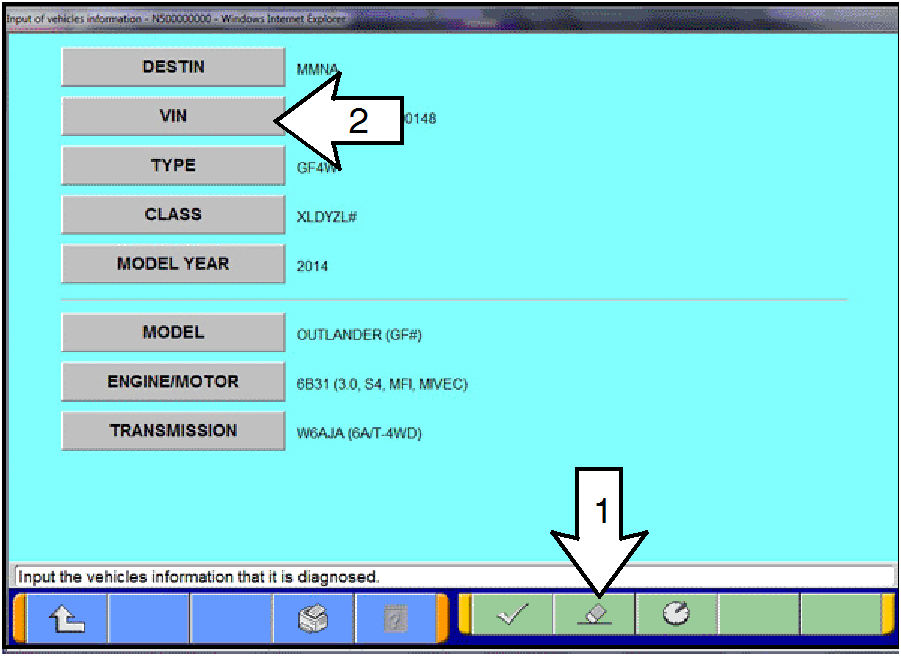 |
- If the VIN or vehicle description displayed does not match the vehicle you are working on, click the eraser icon at the bottom of the page to erase vehicle data.
Then click the “VIN” button.
|
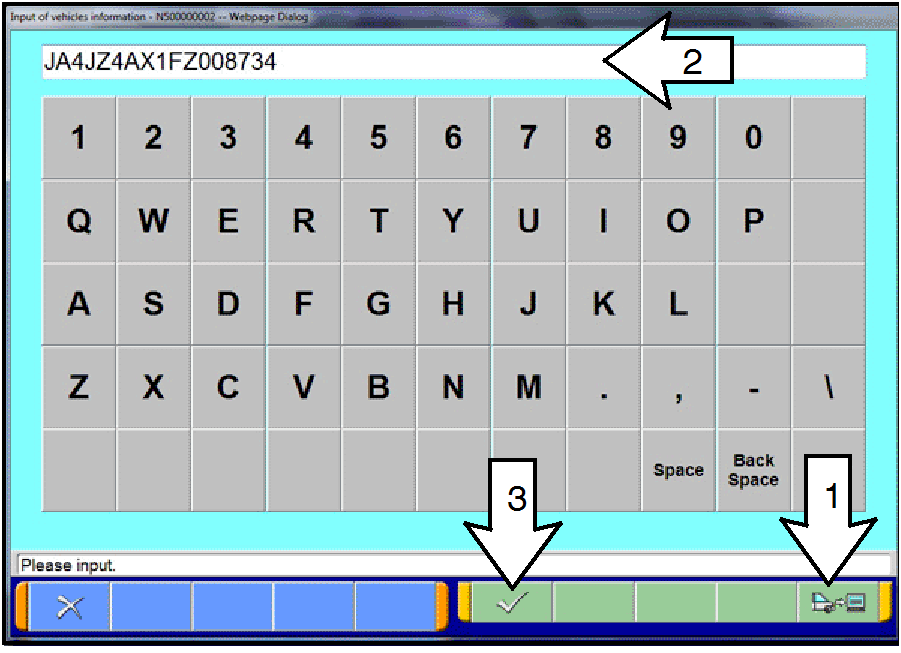 |
- Click the icon in the lower RH corner of the screen to have MUT-III automatically read the VIN.
If a message appears saying the VIN cannot be input automatically, manually enter the 17 digit VIN into the VIN field at the top of the page.
Make sure the VIN is correct and click the check mark.
|
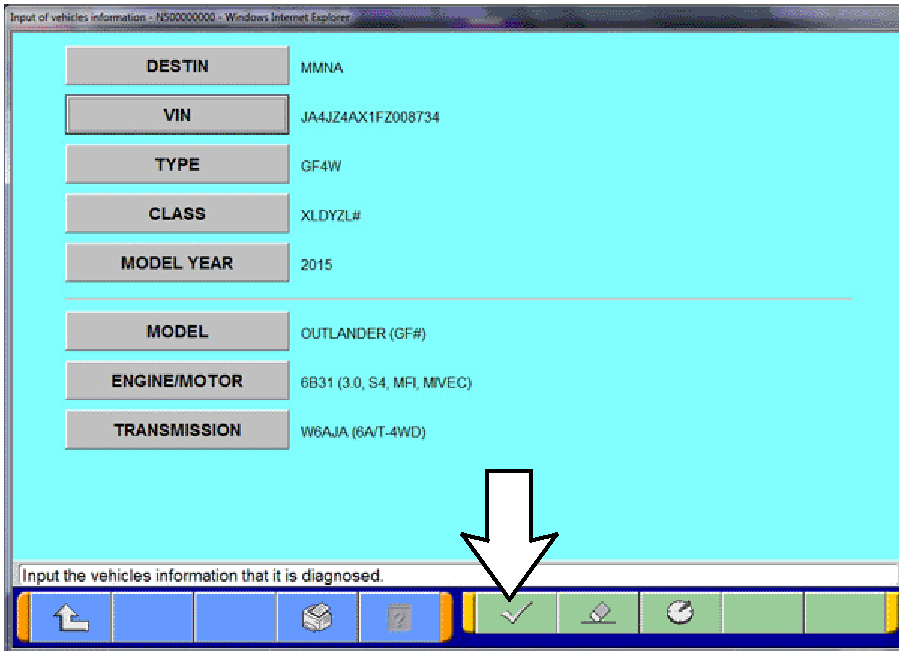 |
- Confirm all data matches the vehicle, then click the check mark at the bottom of the page.
IMPORTANT: If an affected vehicle has a Malfunction Indicator Lamp (MIL) illuminated before reprogramming, and DTCs are listed in ECM memory, diagnose and repair those DTCs per the applicable service manual before reprogramming. DO NOT reprogram the ECM until the reason(s) for other DTCs being set is corrected.
|
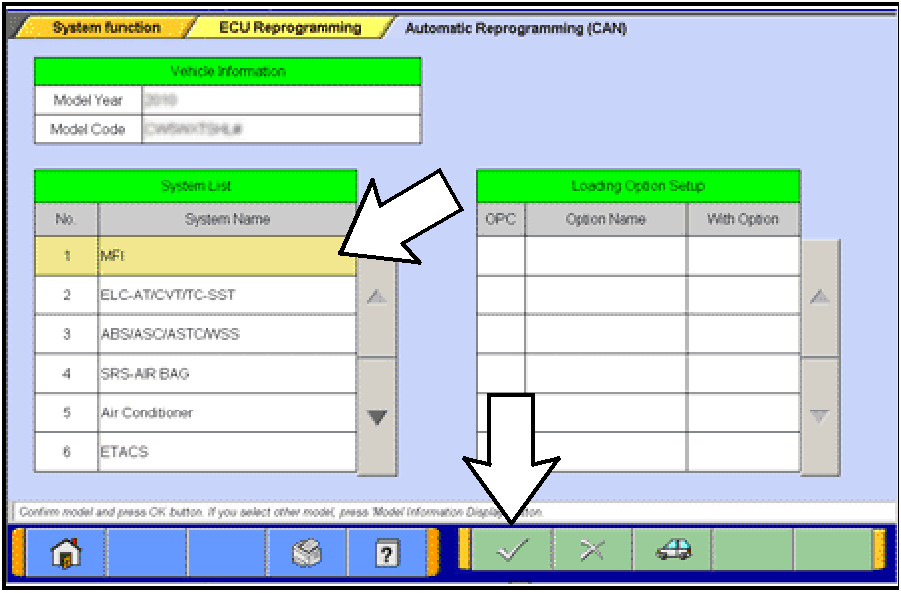 |
- “MFI” should be highlighted by default. If not, click on it to highlight it. Click the check mark to continue.
|
NOTE: In the next step, if the “pop-up” box does not appear, change “Tab” to TIR then back to MUT-III (the pop-up box should then appear).
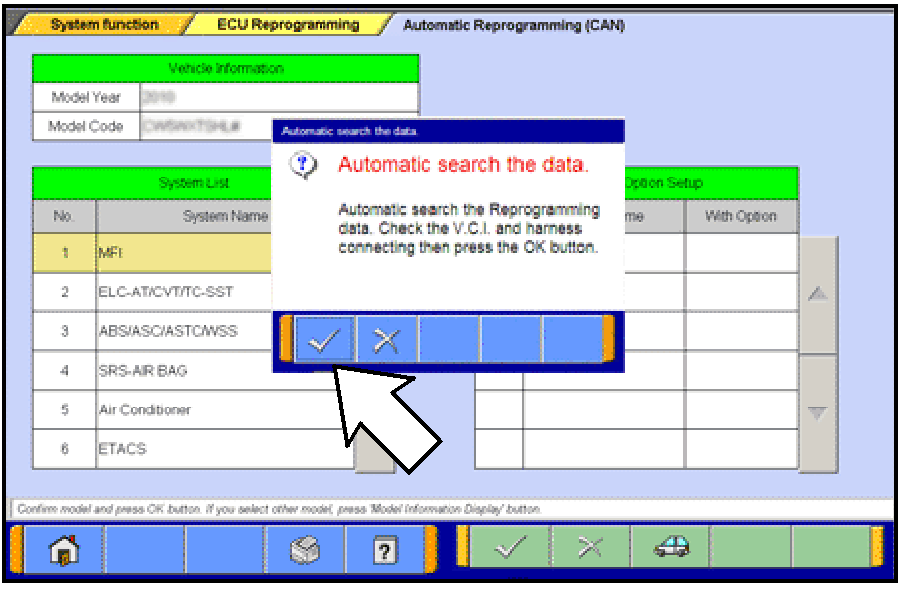 |
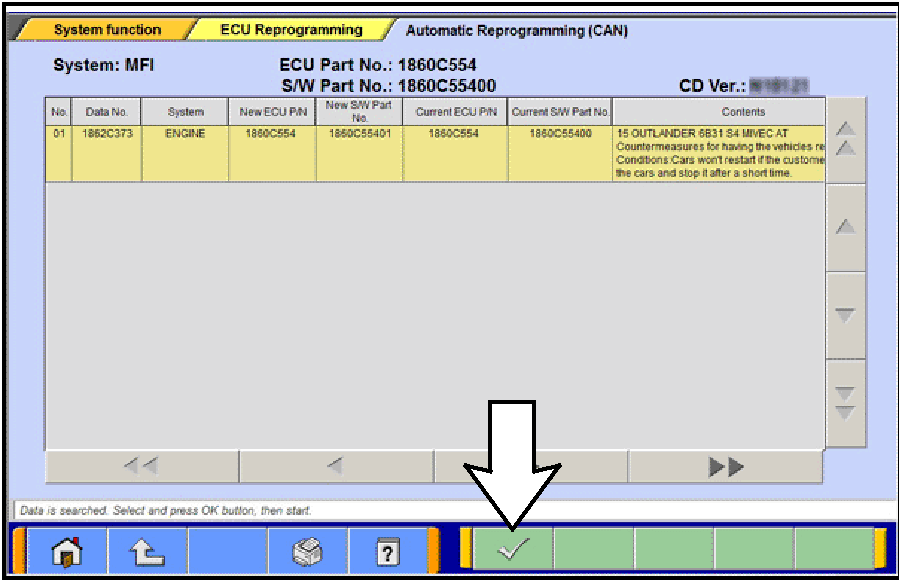
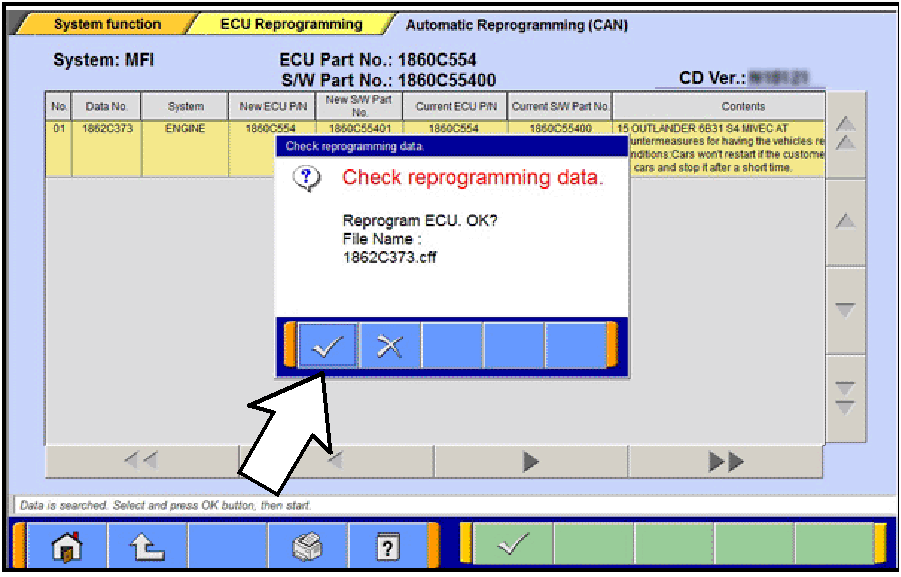
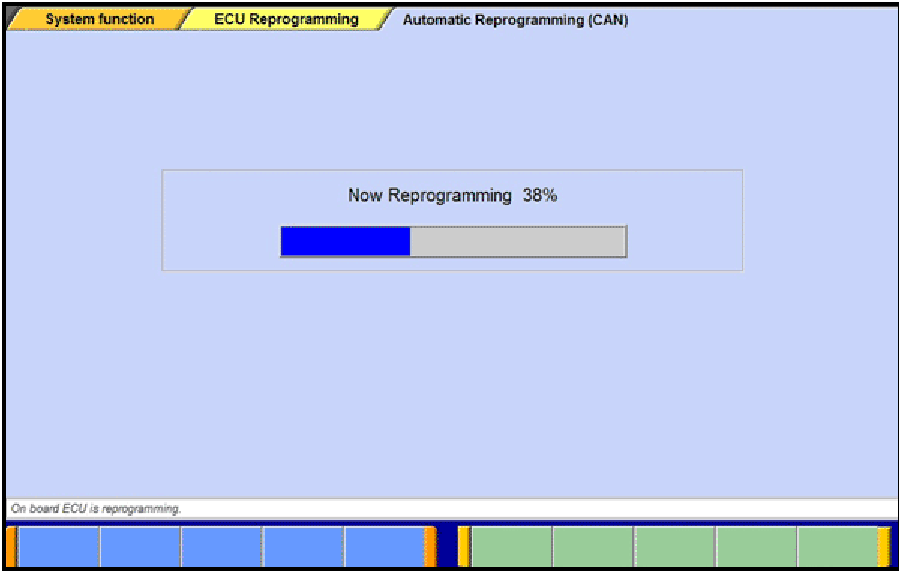
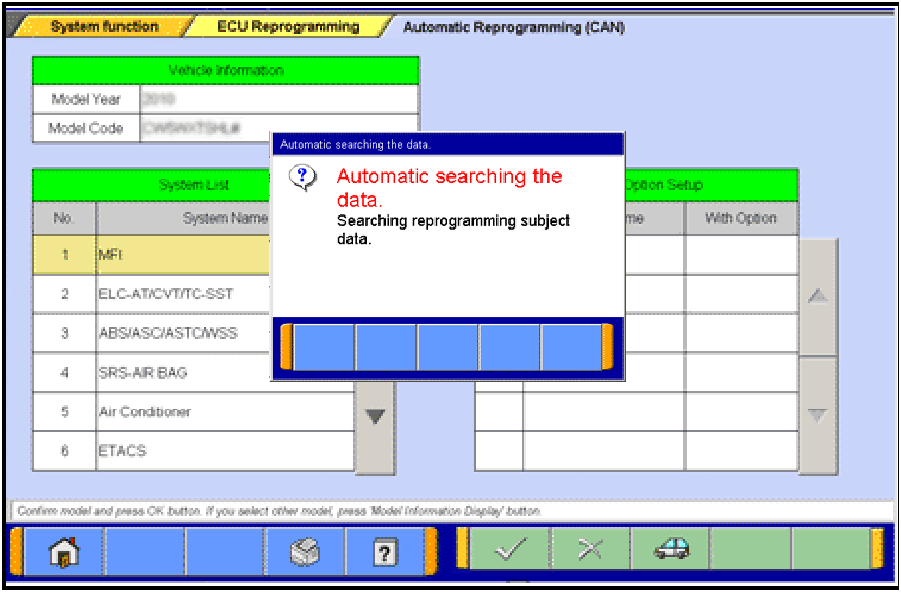
- A message will advise the system will “Automatic search the data.”
Click the check mark to continue.
|
 |
|
|
IF ECU IS ALREADY AT LATEST VERSION
|
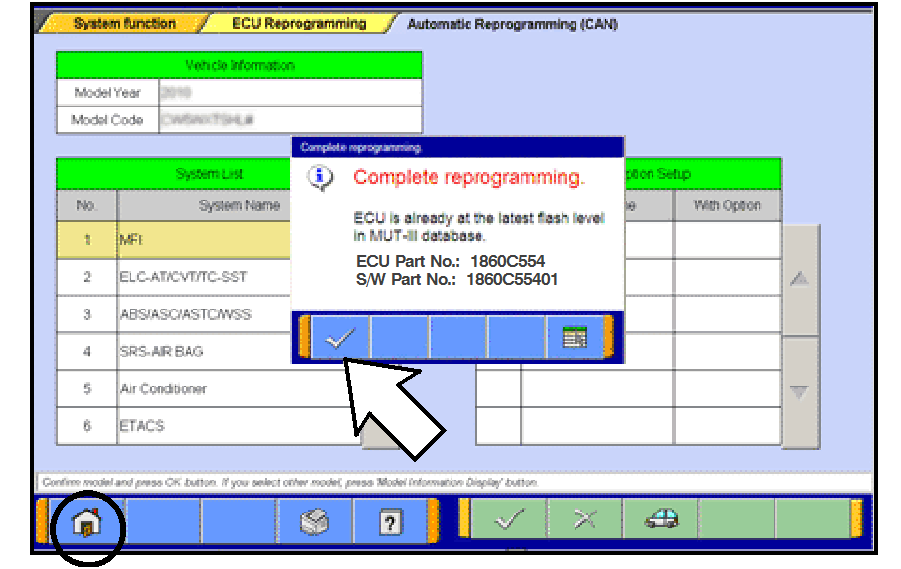 |
If the message seen at left is displayed, the ECU software is already at the most current level. Do not continue with the reprogramming procedure. This TSB does not apply.
Click the check mark to clear the window, then click the Home icon at the lower left corner of the screen to return to the System Select main page.
Turn the ignition switch to the OFF position and disconnect the MUT-III. Turn off and disconnect the battery charger. Conduct normal diagnosis per the service manual.
If a “Complete Reprogramming” message does not appear, continue with the reprogramming procedure.
|

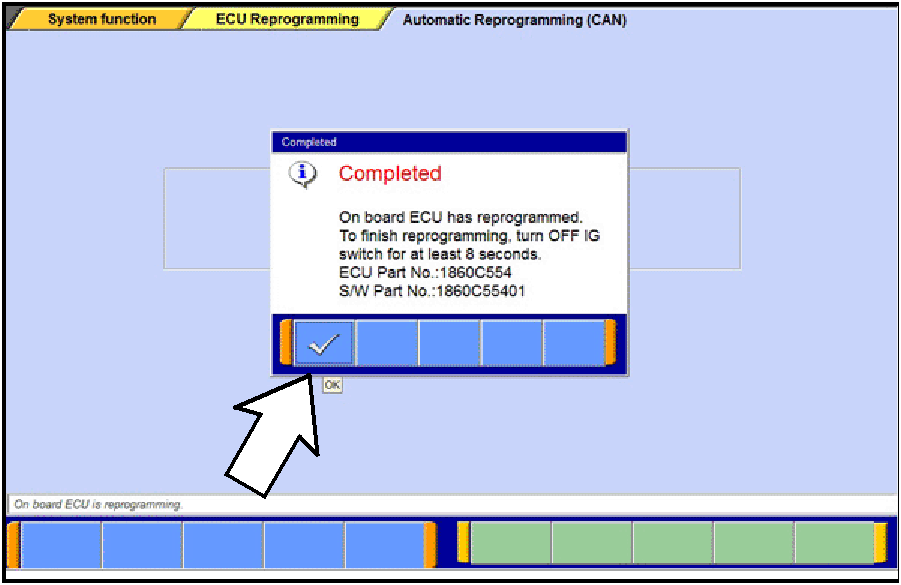 |
- Reprogramming is completed.
- Verify that the S/W Part No. Is correct.
- Click on the check mark.
- Turn OFF ignition switch for at least 8 seconds.
- Turn ignition switch ON, then proceed to the next step.
|
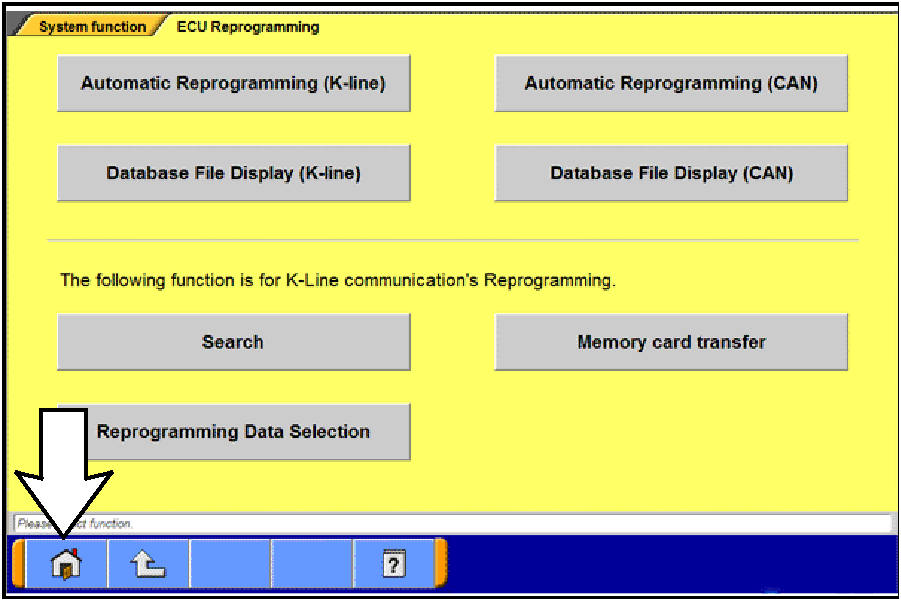 |
- Click on the “home” button.
|
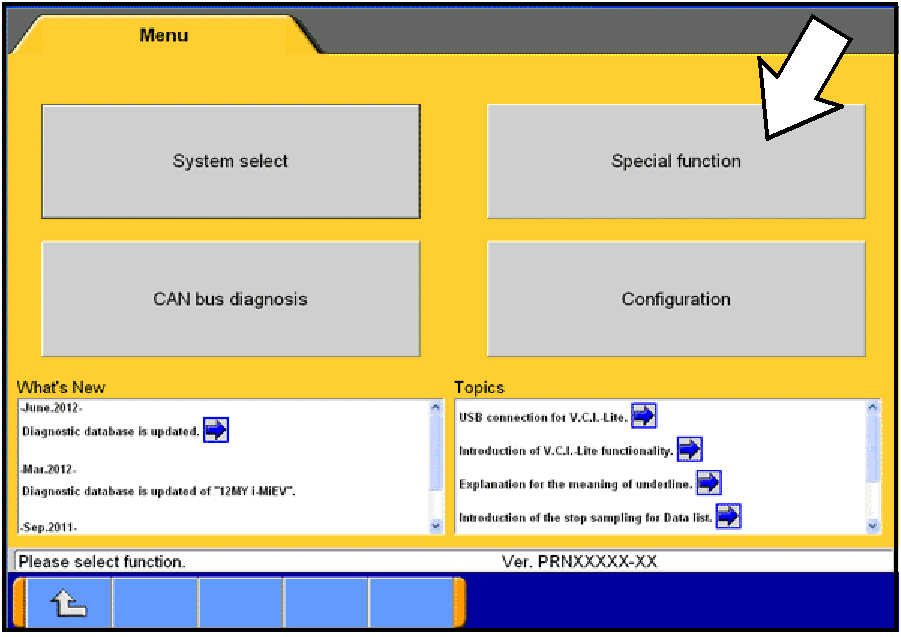 |
- Perform an “Erase and Read all DTCs.”
- Select “Special function.”
|
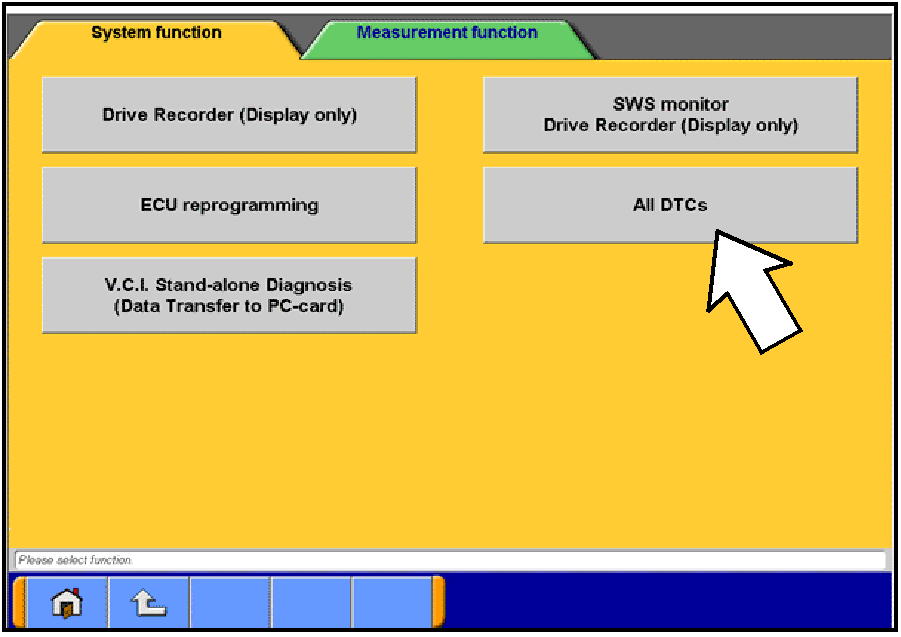 |
- Select “All DTCs.”
|
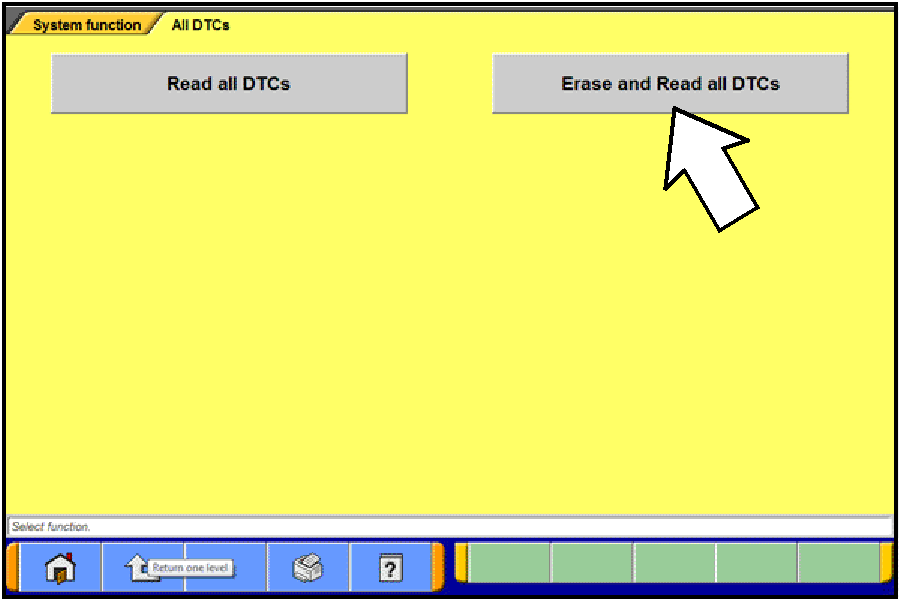 |
- Select “Erase and Read All DTCs.”
|
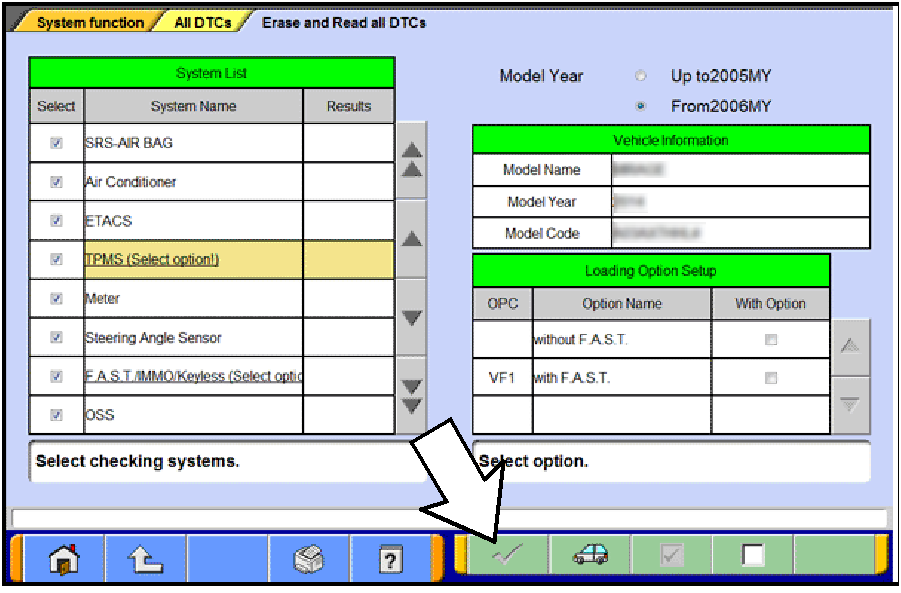 |
- The “System List” on the left side of the screen will have all selections checked. Do not change these selections. DTCs may be set if the vehicle is equipped with options that are unchecked.
- Click the check mark to continue.
|
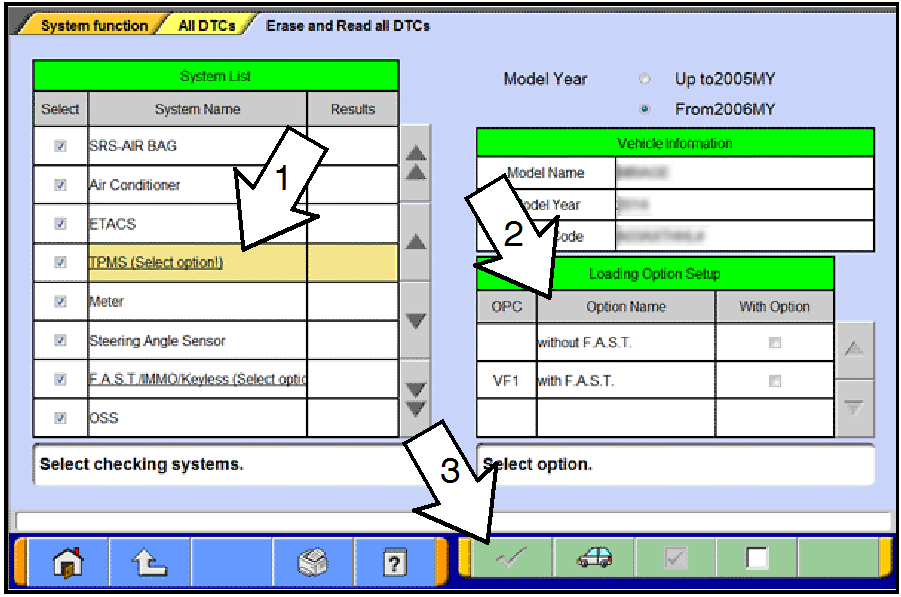 |
NOTE: If, in some cases, the check mark button at the bottom is not active, perform the following:
1) Select the System name that is underlined (for example, TPMS, as shown on left).
2) Select the appropriate option for the vehicle.
Repeat steps 1 and 2 for all underlined systems.
3) Click on the check mark. Wait until MUT-III is finished and click the check mark again to confirm.
|
|
|
- A window will pop up asking you to confirm DTC erasing. Click the check mark for DTC erasing and reading to begin.
|
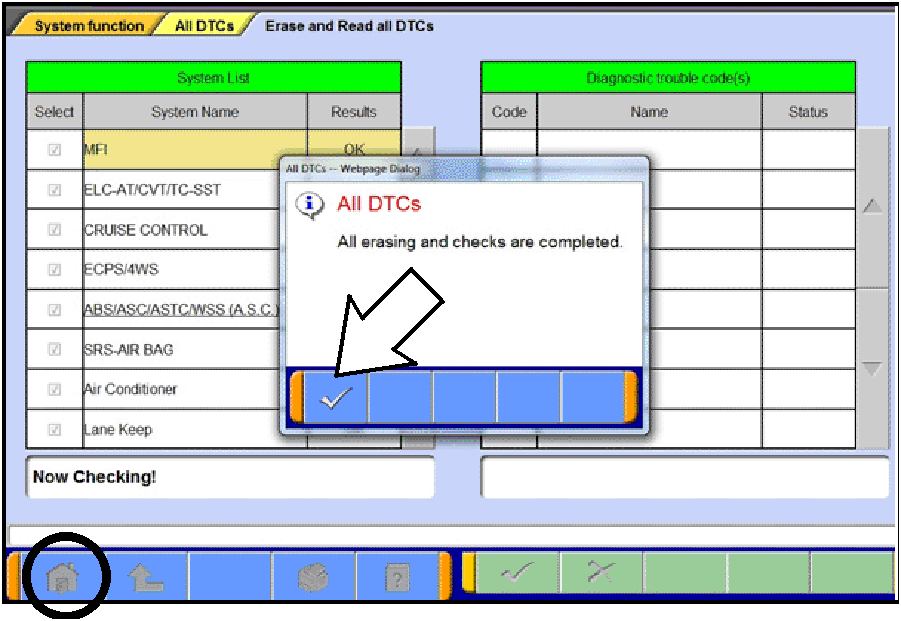 |
- When DTC erasing is completed, click the check mark in the pop-up message that reads “All erasing and checks are completed.”
a. If DTCs return after reprogramming, click the check mark to clear the window. Diagnose and repair per the Service Manual.
b. If DTCs do not return, click the check mark to clear the window, then click the home icon at the lower left of the screen to return to the main menu.
|
- Turn off the ignition switch and disconnect the MUT-III. Turn off and disconnect the battery charger.
- Using a ball-point pen, enter the appropriate ECU part number, Software Part Number (ROM ID#), this Technical Service Bulletin number, your dealer code, and the current date on the Engine Compartment / Control Module Label (p/n MSSF024G00). The Vendor Code is not applicable. The label is available from your facing PDC.
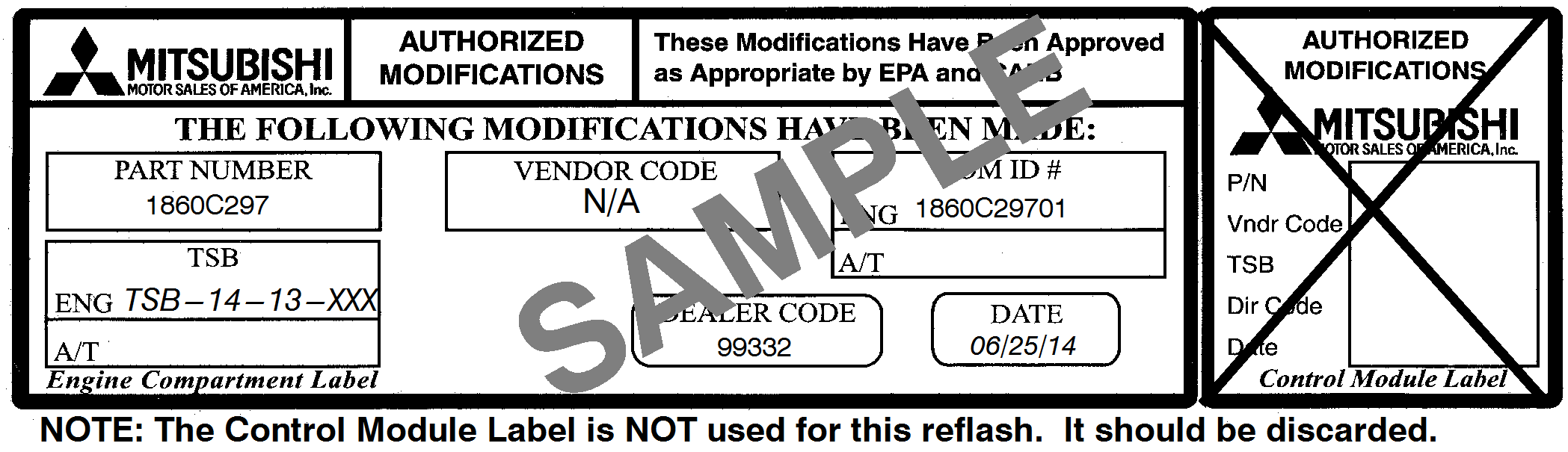
- Carefully remove all dirt and oil from a vacant area near the VECI label on the underside of the hood and affix the Engine Compartment Label (LH side, above) to that area.
- Test drive the vehicle to confirm proper operation and the MIL does not illuminate. Diagnose and correct any DTCs that return.
PARTS INFORMATION
Use only the Genuine Mitsubishi Parts listed below.
|
Description
|
Part Number
|
Quantity
|
|
Label, Engine Compartment
|
MSSF024G00
|
1
|
WARRANTY INFORMATION
This bulletin is supplied as technical information only and is not an authorization to repair. If an affected vehicle is reported with the described condition, diagnose the condition, repair as described in this bulletin and submit a normal warranty claim using the following information.
|
Nature Code: 02B
|
Cause Code: 605
|
|
Labor Operation No.: 13850113
|
Time Allowance: 0.3 hrs.
|
|
Warranty Coverage: 8/80 Emissions Coverage
|
|
|
|
|
Copyright 2016, Mitsubishi Motors North America, Inc.
| The information contained in this bulletin is subject to change. For the latest version of this document, go to the Mitsubishi Dealer Link, MEDIC, or the Mitsubishi Service Information website (www.mitsubishitechinfo.com).
|