|
|
Required Special Tools:
- MB992006: Extra fine probe
- MB991223: Harness set
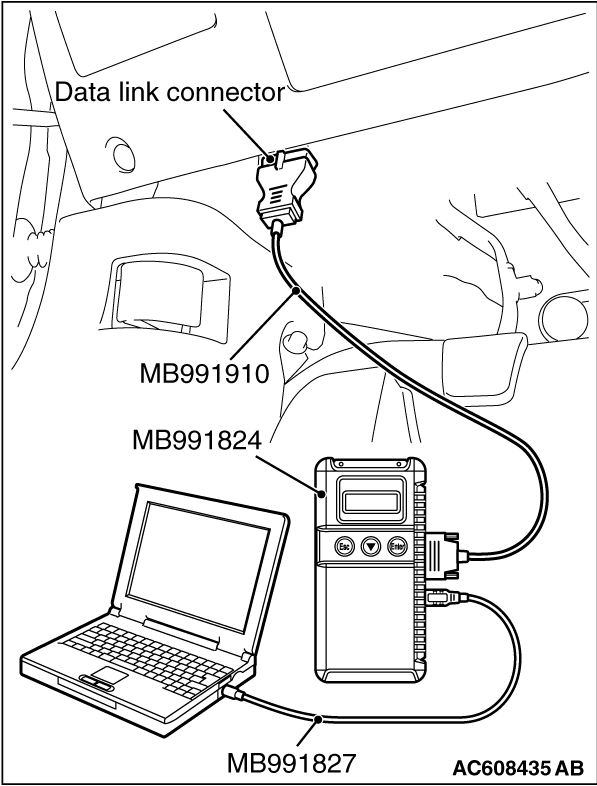
- MB991958 Scan Tool (M.U.T.-III Sub Assembly)
- MB991824: Vehicle Communication Interface (V.C.I.)
- MB991827 M.U.T.-III USB Cable
- MB991910 M.U.T.-III Main Harness A (Vehicles with CAN communication system)
|
|
|
Check the bulb(s) of the light that does not illuminate.
|
|
|
Q.
Is the check result normal?
|
|
|
 Replace the bulb(s) of the light that does not illuminate. Replace the bulb(s) of the light that does not illuminate.
|
|
|
|
|
|
Q.
Is headlight assembly (RH) connector A-57, rear combination light (RH) connector F-06 and rear side marker light (RH) connector F-07 in good condition?
|
|
|
NO : Repair or replace the damaged component(s). Refer to GROUP 00E, Harness Connector Inspection  . .
|
|
|
|
|
|
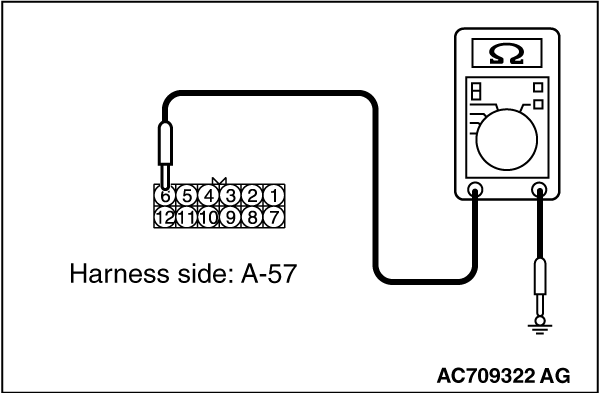
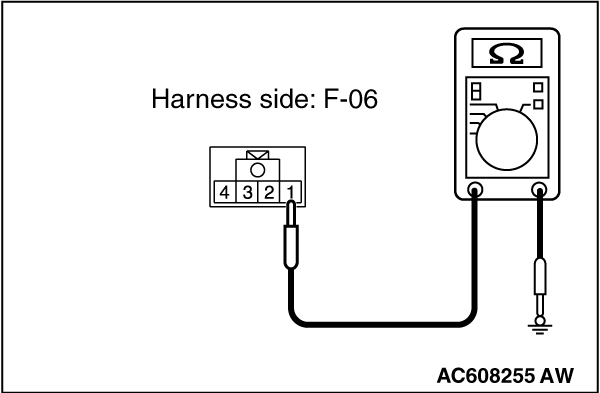
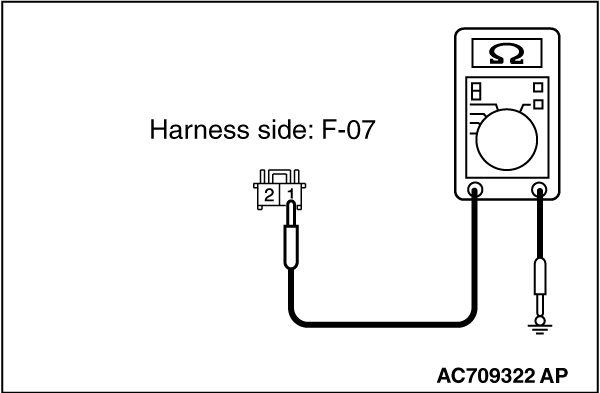
(1)Disconnect the connector, and measure at the wiring harness side.
|
|
(2)Measure the resistance between the connector of light which does not illuminate and the body ground.
- Measure the resistance between headlight assembly (RH) connector A-57 (terminal 6) and the body ground.
- Measure the resistance between rear combination light (RH) connector F-06 (terminal 1) and the body ground.
- Measure the resistance between rear side marker light (RH) connector F-07 (terminal 1) and the body ground.
OK: The measured value should be continuity exists (2 Ω
or less).
Q.
Does the measured resistance value correspond with this range?
 Go to Step 5. Go to Step 5.
Go to Step 4.
|
|
|
Check the ground line for open circuit.
|
|
|
- Check the wiring harness between headlight assembly (RH) connector A-57 (terminal 6) and the body ground.
- Check the wiring harness between rear combination light (RH) connector F-06 (terminal 1) and the body ground.
- Check the wiring harness between rear side marker light (RH) connector F-07 (terminal 1) and the body ground.
| note |
Also check intermediate connector F-27 for loose, corroded, or damaged terminals, or terminals pushed back in the connector. If intermediate connector F-27 is damaged, repair or replace the connector as described in GROUP 00E, Harness Connector Inspection .
|
|
|
|
Q.
Is the wiring harness between headlight assembly connector, rear combination light connector or tail light connector and the body ground in good condition?
|
|
|
The wiring harness may be damaged or the connector(s) may have loose, corroded or damaged terminals, or terminals pushed back in the connector. Repair the wiring harness as necessary.
|
|
|
|
|
|
Q.
Is ETACS-ECU connectors C-304 <position light>
and C-311 <rear side marker light or taillight>
in good condition?
|
|
|
Repair or replace the damaged component(s). Refer to GROUP 00E, Harness Connector Inspection .
|
|
|
|
|
|
Check the power supply line for open circuit or short circuit.
|
|
|
- Check the wiring harness between headlight assembly (RH) connector A-57 (terminal 4) and ETACS-ECU connector C-304 (terminal 7).
- Check the wiring harness between rear combination light (RH) connector F-06 (terminal 3) and ETACS-ECU connector C-311 (terminal 13).
| note |
Also check intermediate connectors D-11 and joint connector C-43 for loose, corroded, or damaged terminals, or terminals pushed back in the connector. If intermediate connector D-11 or joint connector C-43 is damaged, repair or replace the connector as described in GROUP 00E, Harness Connector Inspection .
|
- Check the wiring harness between rear side marker light (RH) connector F-07 (terminal 2) and ETACS-ECU connector C-311 (terminal 13).
| note |
Also check intermediate connectors D-17 and F-27 and joint connector C-43 for loose, corroded, or damaged terminals, or terminals pushed back in the connector. If intermediate connector D-17 or F-27 or joint connector C-43 is damaged, repair or replace the connector as described in GROUP 00E, Harness Connector Inspection .
|
|
|
|
Q.
Is the wiring harness between headlight assembly connector, rear combination light connector or rear side marker light connector and ETACS-ECU connector in good condition?
|
|
|
The wiring harness may be damaged or the connector(s) may have loose, corroded or damaged terminals, or terminals pushed back in the connector. Repair the wiring harness as necessary.
|
|
|
|
|
(1)
| caution |
To prevent damage to scan tool MB991958, always turn the ignition switch to the "LOCK" (OFF) position before connecting or disconnecting scan tool MB991958.
|
Connect scan tool MB991958. Refer to "How to connect scan tool (M.U.T.-III) ."
(2)Turn the ignition switch to the "ON" position.
(3)Erase the DTC.
(4)Turn the ignition switch from "LOCK" (OFF) position to "ON" position.
(5)Check if DTC is set.
Q.
Is the DTC set?
Replace the ETACS-ECU.
The procedure is complete.
|
![[Previous]](../../../buttons/fprev.png)
![[Next]](../../../buttons/fnext.png)
)
)
)
)
)
)
)
)
)
)