|
|
Required Special Tools:
- MB991223: Harness Set
- MB992006: Extra Fine Probe
|
|
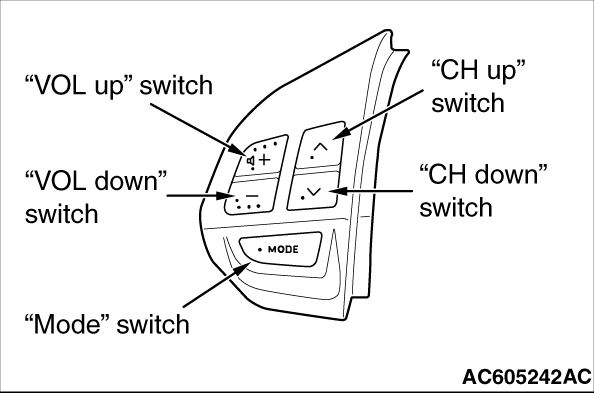
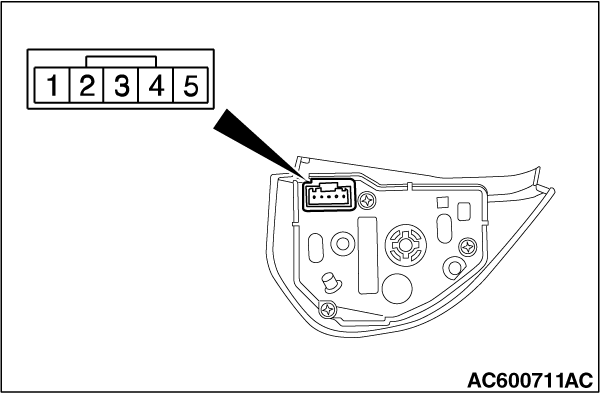
Remove the remote controlled radio switch. Then check continuity between the switch terminals.
|
|
Switch Position
|
Tester Connection
|
Measurement Value
|
No push
|
2 - 4
|
Approximately 71 kΩ
|
Mode
|
Approximately 270 Ω
|
CH up
|
Approximately 740 Ω
|
CH down
|
Approximately 1.3 kΩ
|
VOL up
|
Approximately 2.1 kΩ
|
VOL down
|
Approximately 3.1 kΩ
|
|
Q.
Is the remote controlled radio switch in good condition?
 Go to Step 2. Go to Step 2.
 Replace the remote controlled radio switch. Replace the remote controlled radio switch.
|
|
|
Q.
Are clock spring connector C-204 and C-205 in good condition?
|
|
|
Repair or replace the damaged component (Refer to GROUP 00E, Harness Connector Inspection  ). The steering remote control switch should work normally. ). The steering remote control switch should work normally.
|
|
|
|
|
|
Check whether the clock spring is in good condition (Refer to GROUP 52B - Driver’s Air Bag Module and Clock Spring <Except RALLIART>or <RALLIART>).
|
|
|
Q.
Is the check result normal?
|
|
|
Replace the clock spring.
|
|
|
|
|
|
Q.
Is audio visual navigation unit connector C-12 in good condition?
|
|
|
Repair or replace the damaged component (Refer to GROUP 00E, Harness Connector Inspection ). The steering remote control switch should work normally.
|
|
|
|
|
|
- Check the communication lines for open and short circuit.
|
|
|
Q.
Is the wiring harness between audio visual navigation unit connector C-12 (terminal 53, 69) and clock spring connector C-205 (terminal 2, 3) in good condition?
|
|
|
The wiring harness may be damaged or the connector(s) may have loose, corroded or damaged terminals, or terminals pushed back in the connector. Repair the wiring harness as necessary.
|
|
|
|
|
|
Q.
Is steering remote control switch connector C-202 in good condition?
|
|
|
Repair or replace the damaged component (Refer to GROUP 00E, Harness Connector Inspection ). The steering remote control switch should work normally.
|
|
|
|
|
|
- Check the communication lines for open and short circuit.
|
|
|
Q.
Is the wiring harness between steering remote control switch connector C-202 (terminal 2, 4) and clock spring connector C-204 (terminal 5, 4) in good condition?
|
|
|
The wiring harness may be damaged or the connector(s) may have loose, corroded or damaged terminals, or terminals pushed back in the connector. Repair the wiring harness as necessary.
|
|
|
|
|
|
Check whether you can operate the audio visual navigation unit by using the steering remote control.
|
|
|
Q.
Is the check result normal?
|
|
|
The trouble can be an intermittent malfunction (Refer to GROUP 00, How to use Troubleshooting/inspection Service Points, How to Cope with Intermittent Malfunction ).
|
|
|
|
|
|
Replace the audio visual navigation unit.
|
|
|
|
![[Previous]](../../../buttons/fprev.png)
![[Next]](../../../buttons/fnext.png)
)
)
)
)
)