|
|
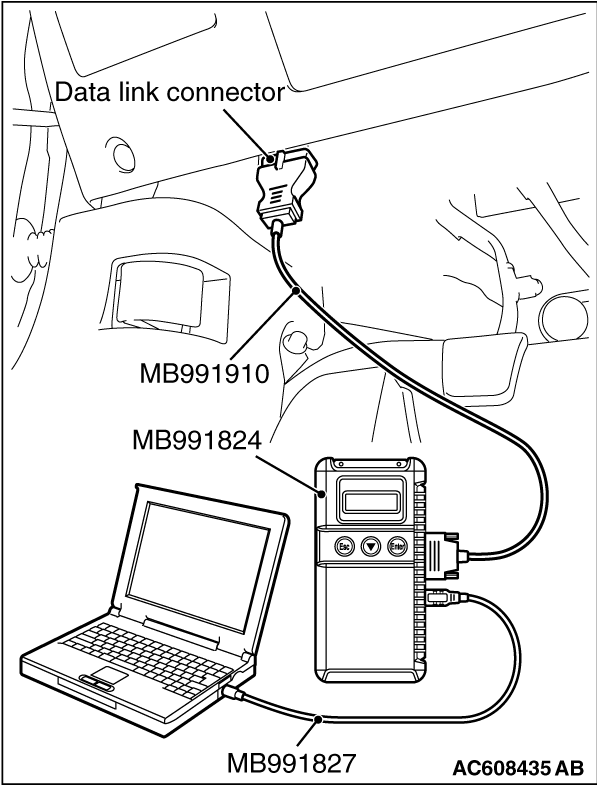
Required Special Tools:
- MB991958: Scan Tool (M.U.T.-III Sub Assembly)
- MB991824: Vehicle Communication Interface (V.C.I.)
- MB991827: M.U.T.-III USB Cable
- MB991910: M.U.T.-III Main Harness A (Vehicles with CAN communication system)
|
|
|
Disconnect the connector from the lighting control sensor, and connect the connector to the lighting control sensor again. Then, check again if the DTC is set to LIN.
|
|
(1)
| caution |
To prevent damage to scan tool MB991958, always turn the ignition switch to the "LOCK" (OFF) position before connecting or disconnecting scan tool MB991958.
|
Connect scan tool MB991958. Refer to "How to connect scan tool  ." ."
(2)Disconnect the connector of lighting control sensor, and connect it again.
| note |
When connecting the connector, follow the correct installation procedure.
|
(3)Turn the ignition switch from "LOCK" (OFF) position to "ON" position.
(4)Check if DTC is set.
Q.
Is the DTC set?
 Go to Step 2. Go to Step 2.
 The lighting control sensor is installed with the wrong procedure. The lighting control sensor is installed with the wrong procedure.
|
|
|
Visually check the presence of scratches or air bubbles <diameter of 5 mm (0.2 inch) or more> on the windshield to which the lighting control sensor is installed. In addition, visually check that the optical coupler is not broken and that the lighting control sensor can be installed.
|
|
|
Q.
Is the check result normal?
|
|
|
Replace the windshield (Refer to GROUP 42A -
Windshield )
|
|
|
|
|
|
Check again if the DTC is set to LIN.
|
|
|
(1)Wipe the windshield surface of the lighting control sensor section thoroughly, and check that the surface is dry. Then, perform the lighting control sensor (rain sensor) adaptation. <Refer to GROUP 51 -
Lighting Control Sensor (Rain Sensor) Adaptation >.
|
|
|
(2)Turn the ignition switch from "LOCK" (OFF) position to "ON" position.
|
|
|
Replace the lighting control sensor.
|
|
|
|
|
|
The trouble can be an intermittent malfunction (Refer to GROUP 00 -
How to use Troubleshooting/Inspection Service Points -
How to Cope with Intermittent Malfunction ).
|
|
|
|
![[Previous]](../../../buttons/fprev.png)
![[Next]](../../../buttons/fnext.png)
)