![[Previous]](../../../buttons/fprev.png)
![[Next]](../../../buttons/fnext.png)
DTC P1237: Accelerator
Pedal Position Sensor Plausibility
TECHNICAL DESCRIPTION
Compare the output value of the accelerator pedal position sensor (main) with that of
the accelerator pedal position sensor (sub).
MONITOR EXECUTION
Continuous
MONITOR EXECUTION CONDITIONS (Other monitor and Sensor)
Other Monitor (There is no temporary DTC stored in memory
for the item monitored below)
Sensor (The sensor below is determined to be normal)
DTC SET CONDITIONS
Logic Flow Chart
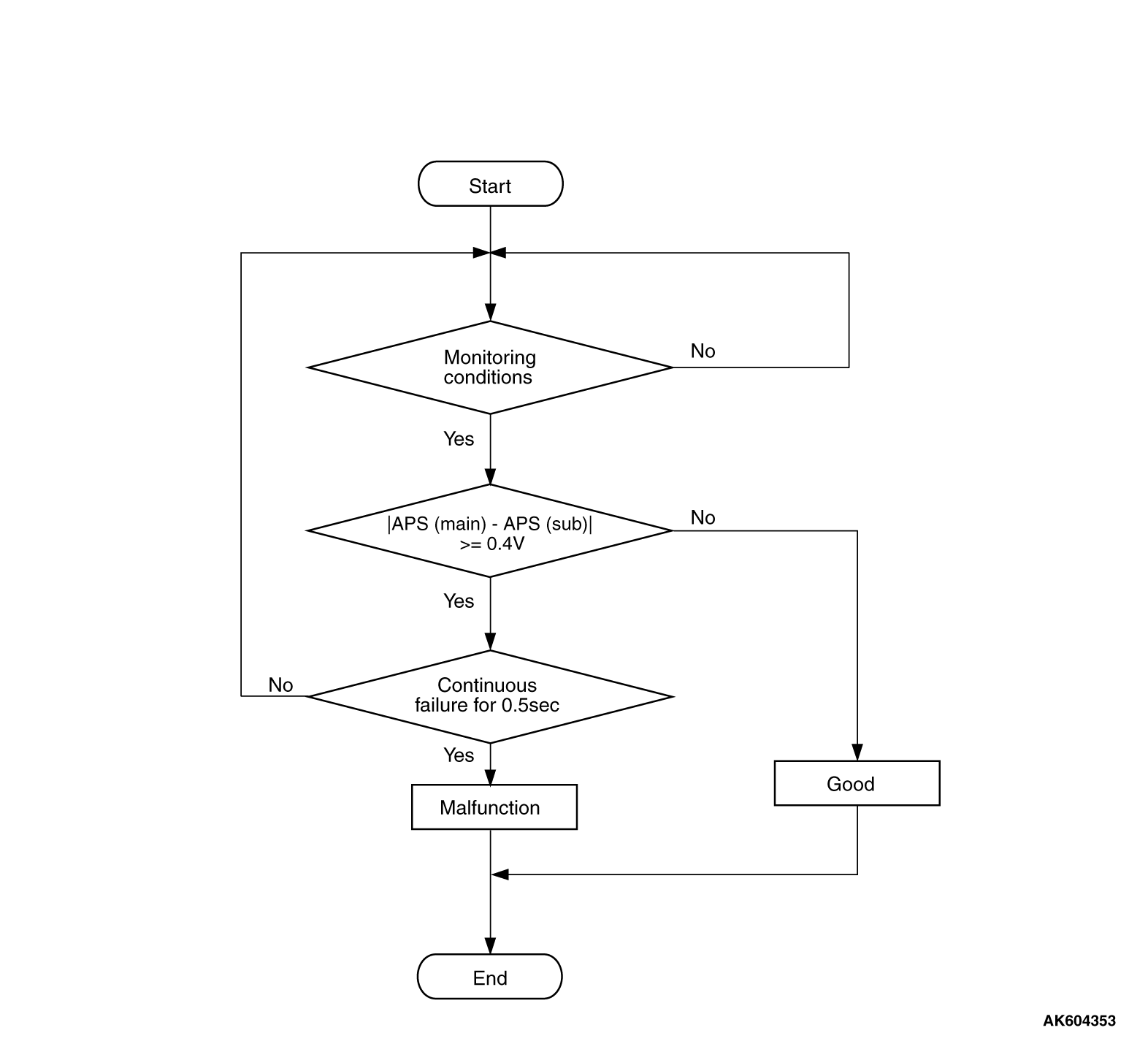
Check Condition
- Change of accelerator pedal position sensor (sub) output voltage per 40 milliseconds
is lower than 0.06 volt.
- Range/performance error of accelerator pedal position sensor (main and sub) circuit
is not detected.
Judgment Criterion
- Voltage obtained with the formula given below is 0.4 volt or higher for 0.5 second:
accelerator pedal position sensor (main) output voltage -
accelerator pedal position
sensor (sub) output voltage.
|
|
| note |
The accelerator pedal position sensor voltage used for the judgement is converted into
the accelerator pedal position sensor voltage for the internal processing by the ECM.
|
|
OBD-II DRIVE CYCLE PATTERN
None.
TROUBLESHOOTING HINTS (The most likely causes for this code to be set are:)
- Accelerator pedal position sensor failed.
- ECM failed.
|
|
Required Special Tools:
- MB991958: Scan Tool (M.U.T.-III Sub Assembly)
- MB991824: V.C.I.
- MB991827: USB Cable
- MB991910: Main Harness A
|
|
|
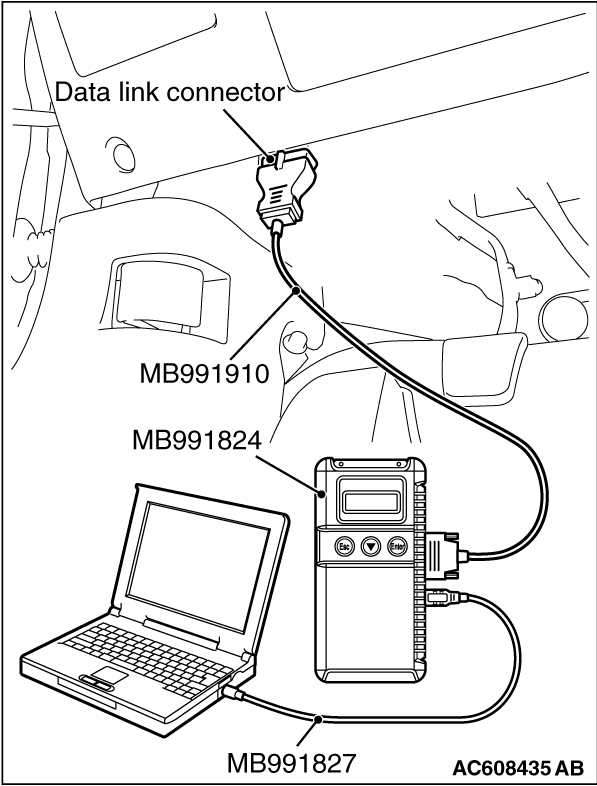
STEP 1. Using scan tool MB991958, read the diagnostic trouble
code (DTC).
|
|
| caution |
To prevent damage to scan tool MB991958, always turn the ignition switch to the "LOCK"
(OFF) position before connecting or disconnecting scan tool MB991958.
|
(1)Connect scan tool MB991958 to the data link connector.
(2)Turn the ignition switch to the "ON" position.
(3)Read the DTC.
(4)Turn the ignition switch to the "LOCK" (OFF) position.
Q.
Is the diagnostic trouble code other than P1237 set?
 Refer to, Diagnostic Trouble Code Chart Refer to, Diagnostic Trouble Code Chart  . .
 Go to Step 2. Go to Step 2.
|
|
|
STEP 2. Using scan tool MB991958, check data list.
|
|
|
(1)Turn the ignition switch to the "ON" position.
|
|
|
(2)Check the following item in the data list. Refer to Data List Reference Table .
- Item 11: Accelerator pedal position sensor (main)
- Item 12: Accelerator pedal position sensor (sub)
|
|
|
(3)Turn the ignition switch to the "LOCK" (OFF) position.
|
|
|
Q.
Is the sensor operating properly?
|
|
|
Go to Step 3.
|
|
|
|
|
|
Repair or replace it. Then go to Step 4.
|
|
|
|
|
|
STEP 3. Using scan tool MB991958, read the diagnostic trouble code
(DTC).
|
|
|
(1)Turn the ignition switch to the "ON" position.
|
|
|
(2)After the DTC has been deleted, read the DTC again.
|
|
|
(3)Turn the ignition switch to the "LOCK" (OFF) position.
|
|
|
Replace the ECM. When the ECM is replaced, register the ID code. Refer to GROUP
42B, Diagnosis -
ID Code Registration Judgment Table <Vehicles with KOS> or
GROUP 42C, Diagnosis -
ID Codes Registration Judgment Table <Vehicles with WCM> .
Then go to Step 4.
|
|
|
|
|
|
It can be assumed that this malfunction is intermittent. Refer to GROUP 00, How
to Use Troubleshooting/Inspection Service Points -
How to Cope with Intermittent Malfunctions .
|
|
|
|
|
|
STEP 4. Using scan tool MB991958, read the diagnostic trouble code
(DTC).
|
|
|
(1)Turn the ignition switch to the "ON" position.
|
|
|
(3)Turn the ignition switch to the "LOCK" (OFF) position.
|
|
|
Retry the troubleshooting.
|
|
|
|
|
|
The inspection is complete.
|
|
|
|
)
)